Ah, ok. I just activated it.
1 Like
Awesome, I have download them, You’ll notice that both the advertisement counter and the download counter are now updating correctly.
1 Like
Yes, I saw that, great!  So far NymShare is pretty cool!
1 Like
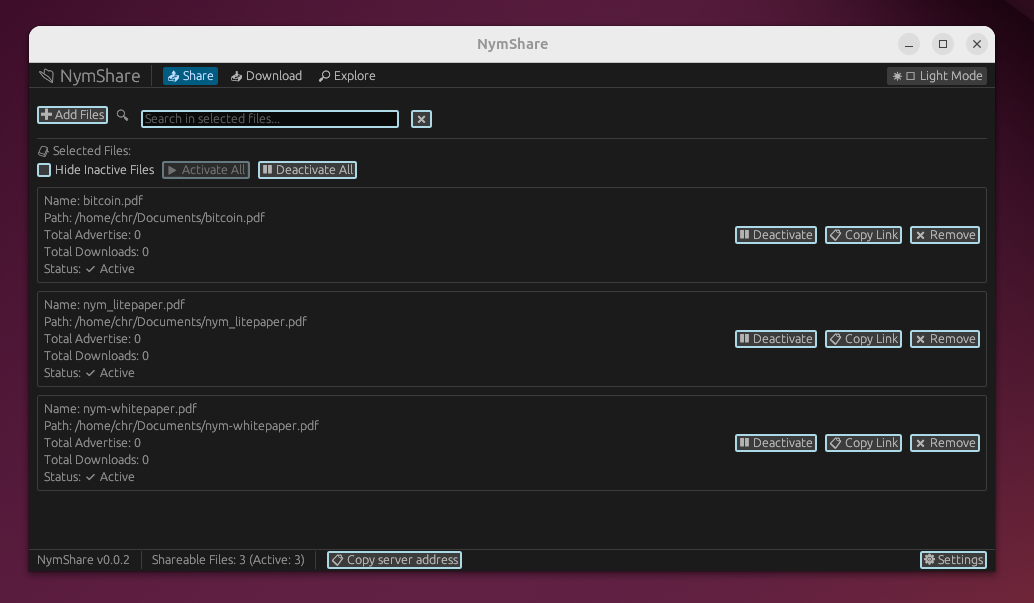
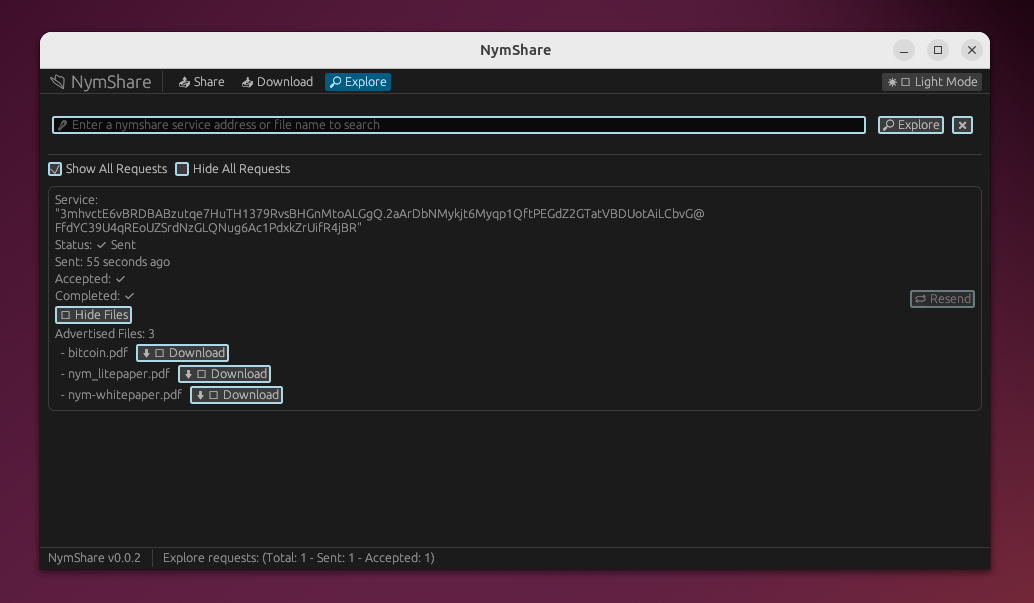
I add show/hide advertise files support for each service, also I make the them dark by default, but still users can switch to light..
1 Like
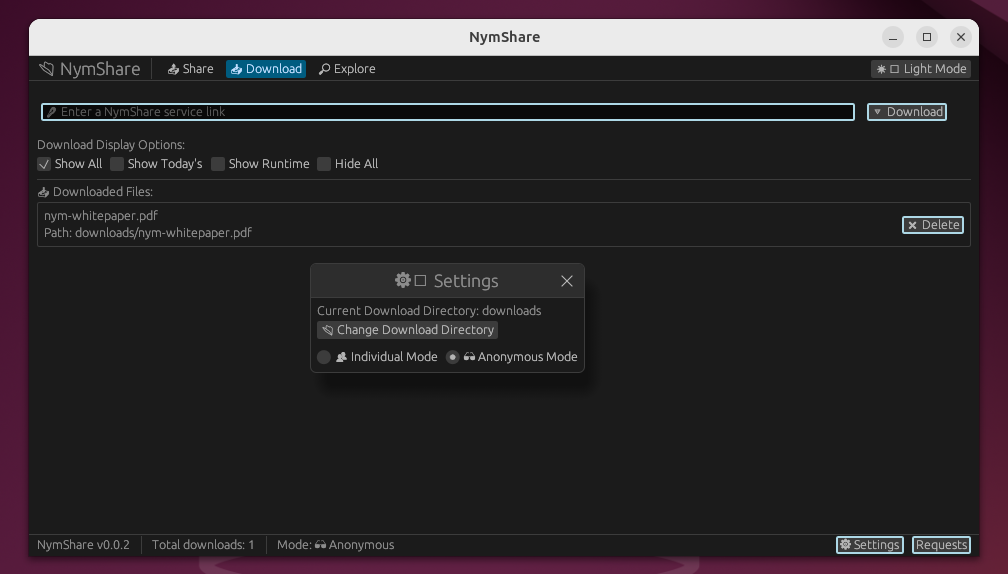
Now users can choose the download mode
Anonymous- Server not learn the client nym addressIndividual- Server learn the client nym address
In the Download tab under Settings, switch between Anonymous and Individual download modes.
1 Like
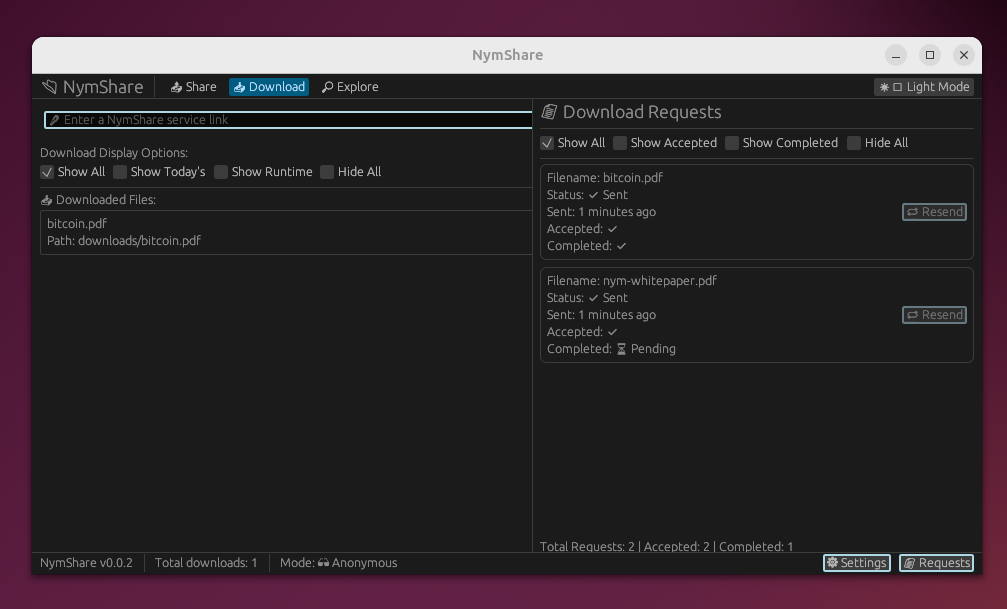
@ch1ffr3punk Do you think it would be better to place the download request in a sidebar instead of opening it in a new tab ?
2 Likes
This looks really good. I like it.
1 Like
great tool!!
some ideas:
make data in app persistant, allow to remove in GUI items in the explorer tab
1 Like
Hi, thanks very much. I’ve got a lot on my mind and forgot to include the feature for removing items in the GUI’s explorer tab, and probably I have forget more, I have to write a TODO list, thanks for the reminder! I have changes ready to commit, and I’ll add that feature, if you notice anything else or have other suggestions, please let me know. I’ll post an update there once it’s done, likely by tomorrow.
1 Like
@rachyandco Done, I just merged the pull request, which includes the feature along with some additional changes: sidebar settings windows for both the Share tab and the Download tab, plus a sidebar for the download Requests. @ch1ffr3punk whenever you get a chance, take a look..
1 Like
Hi @XRoot, I am currently working on my Onion Courier Tor Hidden Service Mixnet, for NymVPN users and other users as well. So, it can take a little time until I can test your
new release of NymShare. But it should not take so long.
1 Like
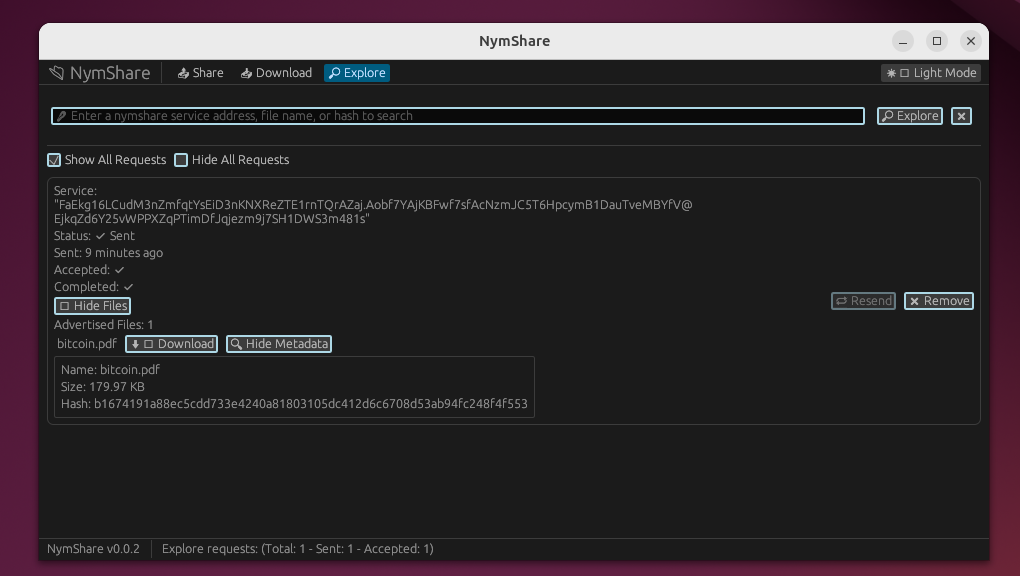
Now, when exploring advertised files, users can view each file’s size and SHA-256 hash prior to downloading. All downloads from advertised files are verified against the advertised file size and SHA-256 hash, ensuring the received file matches the claimed metadata of the file that users asked for, preventing delivery of incorrect or tampered data. Additionally, users can now search for files by their SHA-256 hash in the explore tab’s search bar, with matching files prominently displayed assume they can be found on any explore request..
2 Likes
I made some improvements to the backend. Before pushing the changes, I was experimenting with the UI design. Currently, the buttons are visible next to each shareable file, but I’m thinking of removing them and instead adding a context menu for each file.
Currently, the buttons are visible next to each shareable file
In the updated version, I’m planning to remove those visible buttons and replace them with a cleaner layout
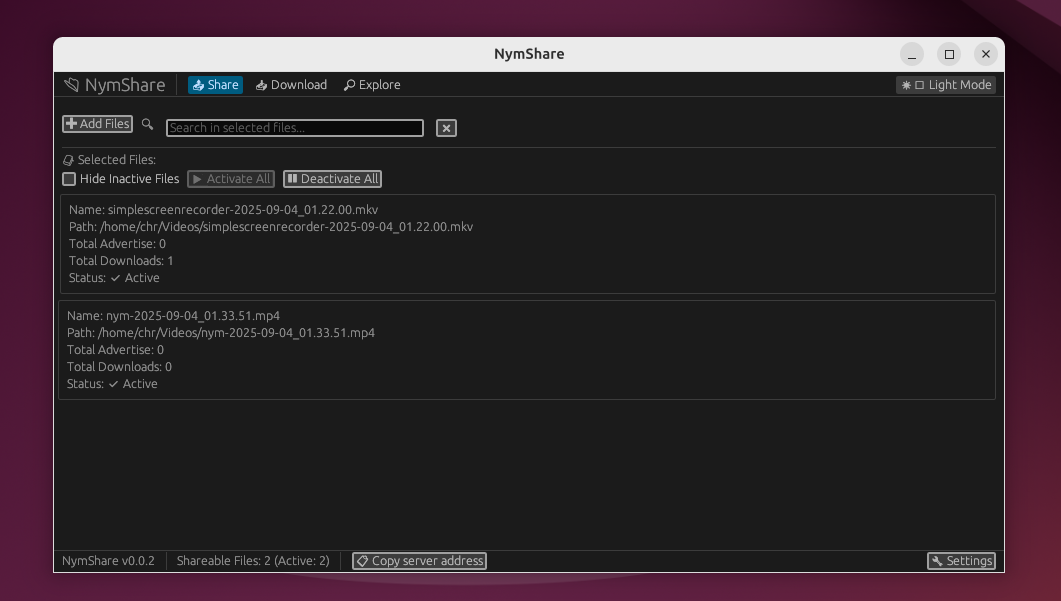
Now, when a user clicks on a file, they’ll be able to access the operation buttons via a context menu
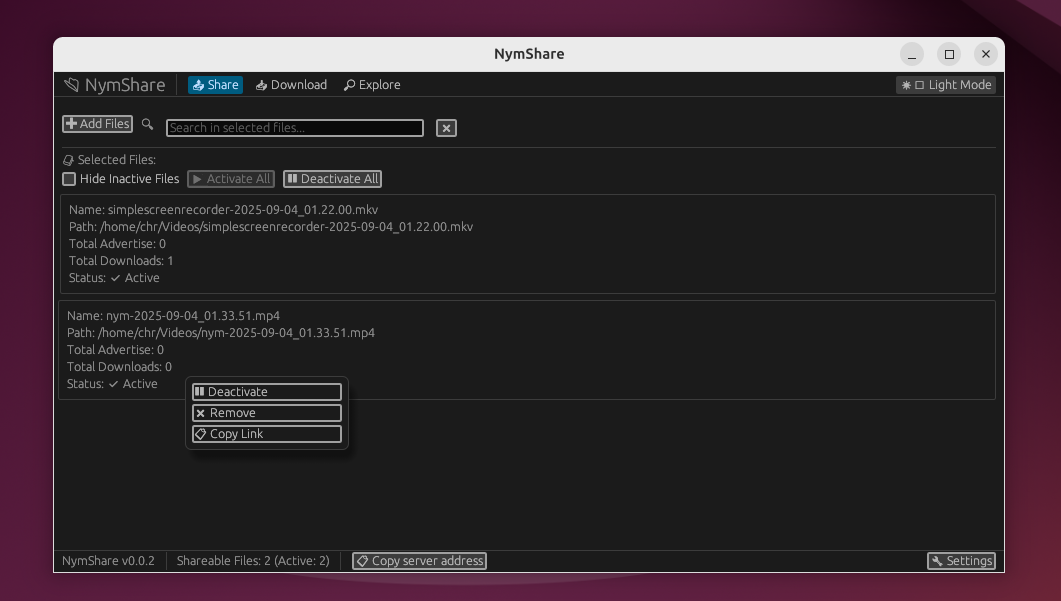
I’m thinking of applying the same context menu design across the entire app to replace most of the action buttons. Thoughts ?
2 Likes
Using egui’s response.context_menu(), you could do something like:
let response = ui.horizontal(|ui| {
ui.label(&file.name);

if ui.button(if file.active { "🟢 Active" } else { "⭕ Inactive" }).clicked() {

    file.active = !file.active;

}
}).response;
response.context_menu(|ui| {
if ui.button("📋 Copy Link").clicked() {

    // Copy NymShare link

    ui.close_menu();

}

if ui.button("📊 View Stats").clicked() {

    // Show download count

    ui.close_menu();

}

// Other secondary actions...
});
1 Like
Hi NymShare team,I’m [Bikram Biswas), a privacy-focused enthusiast who stumbled upon your project via the Nym forum thread . I love how NymShare leverages the mixnet for anonymous P2P sharing—it’s a clever, lightweight tool that fills a real gap in privacy-preserving file transfer.As someone excited about the project, I spent some time playing with AI tools, ( LLM + Others) the egui-based UI for potential privacy/usability tweaks, focusing on the Share tab (e.g., reducing clutter with context menus while hardening local exposures like clipboard persistence). I compiled a short, evidence-based report, no hallucinations, just verified against your repo and egui docs . It includes:Key Insights: Low-risk suggestions like hybrid menus (primary buttons visible, secondaries in context) to avoid discoverability issues, plus secure patterns for Nym addresses and links.
Runnable Sample: A minimal egui app (nymshare-egui-sample) demoing context menus on file rows, masked addresses, ctx.copy_text for links, zeroize for secrets, and auto-clearing clipboard (thread/tokio options). [Link to Gist/ZIP: Assets – Google Drive
Information: In my Google docs ..I created 1 zip file, 1 python script, 1 AI genarated Text ( LLM USED) .
And also Go to my new GitHub Respo ( Additional)
(repos have it for more ideas, and your feedback is important).
Why I am Sharing This?
Your project already nails network privacy, but UI tweaks like these could make local use even safer (e.g., auto-clearing copied links prevents shoulder-surfing leaks) and more polished, potentially attracting more users in the privacy space. It’s unsolicited, but I hope it’s helpful as a starting point; no pressure to adopt!
If useful, I’d love your feedback . Thanks for building cool stuff, keep up the great work!
1 Like
Nym-share-suggestions-/feature/share-tab-context-menu at main · BikramBiswas786/Nym-share-suggestions- Nym-share-suggestions-/feature/share-tab-context-menu at main · BikramBiswas786/Nym-share-suggestions- · GitHub
1 Like
Sorry to bother you again,I am just wanna say.. your Oct 7 metadata integration in the Explore tab is a smart way to handle verification without extra steps.If the Share tab button layout ever feels crowded during your context menu experiments, here’s a zero-dependency snippet using egui 0.22.0. It keeps primary toggles inline for quick access while adding right-click options for secondaries. Tested locally on Ubuntu 22.04 no overhead, and it slots into tabs.rs.
Snippet (paste into file rendering loop)
use egui::Response;

// In your ScrollArea show loop (e.g., ~lines 1200–1230):
let response = ui.horizontal(|ui| {
    // Existing row (name, status, toggle)
    ui.label(&file.name);
    ui.label(if file.active { "● Active" } else { "○ Inactive" });
    if ui.button(if file.active { "Deactivate" } else { "Activate" }).clicked() {
        file.active = !file.active;
    }
}).response;

// Optional secondaries via right-click (primaries stay inline)
response.context_menu(|ui| {
    if ui.button("Copy Link").clicked() {
        let link = format!("{}::{}", app.service_addr, file.name);
        ui.ctx().copy_text(link);
        ui.close_menu();
    }
    ui.separator();
    if ui.button("View Metadata").clicked() {
        app.metadata_window = Some(file.request_id);
        ui.close_menu();
    }
    ui.separator();
    if ui.button("Remove File").clicked() {
        file.marked_for_removal = true;
        ui.close_menu();
    }
});

// After loop
app.shareable_files.retain(|f| !f.marked_for_removal);
Quick notes:
-
Uses your existing fields (service_addr, active, request_id, metadata_window); rename if your code uses different identifiers.
-
Right-click/long-press is native in egui; no extra dependencies or runtime changes.
-
Measured overhead is minimal (~+0.1 ms/frame at 50 rows using egui’s frame time history).
If this helps your UI tweaks, happy to refine (for example, add a “Copy hash” action). Otherwise, you can just avoid this , BTW your inline design is solid . I just tried to help …I am digging all your codes since last 3 days.
2 Likes
I currently have no time to try out the latest release, but have advertised today NymShare on several Usenet Newsgroups. 
1 Like
Hi, I understand, Thanks very much. I’ve pushed a lot of changes, some visible in the UI and on backend. Still got plenty of improvements planned for both.
3 Likes
Hi, Thanks very much for the suggestions.
1 Like