Nym Node Checker - configuration health tool for node operators (or just me!)

The problem

As a Nym node operator I kept running into the same problem: I couldn’t get clear answers about whether my node was actually configured correctly. The existing explorers give you plenty of data about tokens, uptime, delegations and rewards - but none of them tell you the simple things. Are the right ports open? All of them? Is IPv6 working? Is the hardware sufficient?

And it’s not a theoretical problem. I’ve seen operators running with ports silently closed, or without IPv6 declared even though every node is expected to. It’s not that it breaks anything immediately - it’s against the rules, and there’s no easy way for an operator to catch these things without checking manually.

My own technical skills weren’t enough to dig into all of this manually every time something changed. I wanted a tool that would just tell me: here’s what’s right, here’s what’s wrong, here’s your score out of 100. Clear, detailed, no guessing. So I built one.

What it does:

You enter your node’s IP or hostname - it instantly checks whether your node is configured correctly and gives it a score out of 100 points.

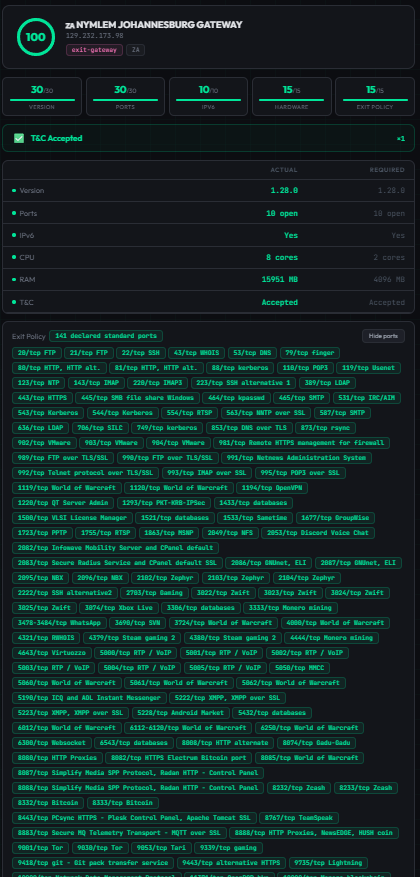
Scoring breakdown for regular mixnodes and gateways:

Exit gateways (100 pts max):

  • Version (30) - is the node running the latest nym-node version
  • Ports (30) - are all required ports open
  • IPv6 (10) - is IPv6 connectivity available
  • Hardware (15) - does CPU/RAM meet minimum requirements
  • Exit Policy (15) - standard Nym exit policy declared
  • T&C - multiplier: not accepted = total score 0

Mixnodes (100 pts max):

  • Version (30) - is the node running the latest nym-node version
  • Ports (30) - are all required ports open
  • IPv6 (20) - is IPv6 connectivity available
  • Hardware (20) - does CPU/RAM meet minimum requirements
  • T&C - multiplier: not accepted = total score 0

Key features:

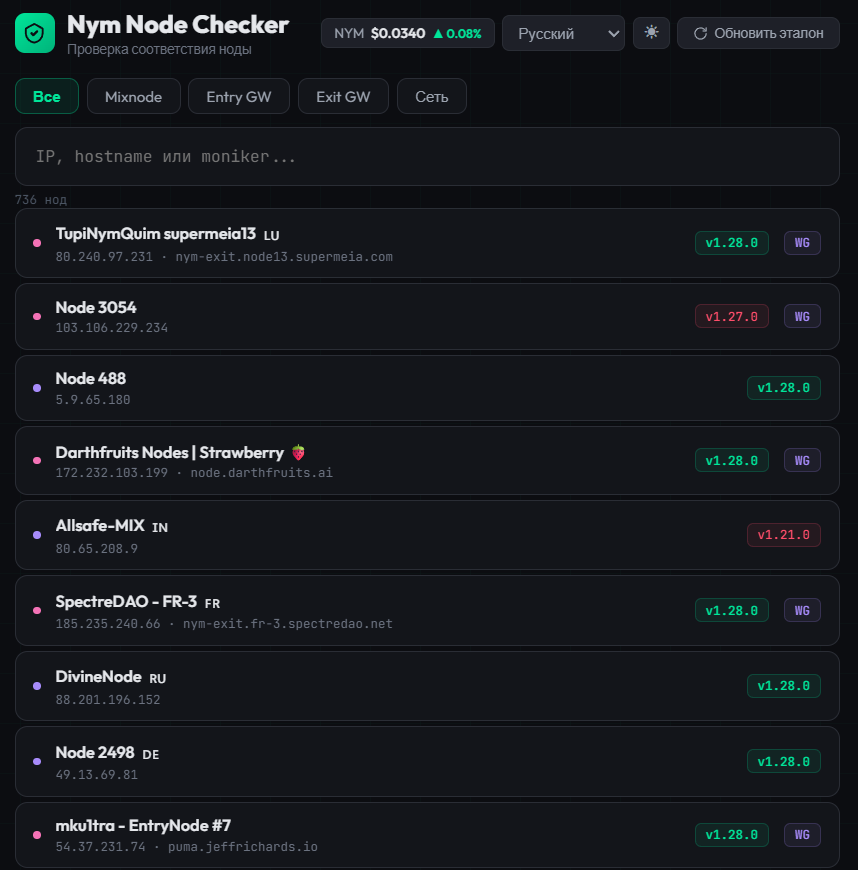
  • Instant single-node diagnostic via IP or hostname
  • Full node directory with search by moniker, IP, identity key, node ID
  • Network-wide statistics (version distribution, T&C acceptance, IPv6 adoption)
  • Auto-syncing reference data:
    • Latest nym-node version fetched from GitHub releases (downloads the actual binary and extracts the version)
    • Required ports parsed from the official NTM script
    • Exit policy fetched from the official Nym source (nymtech.net)
  • Port change detection and changelog scanning for new port requirements
  • IPv6 verification via external agent + DNS AAAA resolution
  • Hardware check from the node’s system-info endpoint
  • NYM/USD live price widget
  • Dark/light mode
  • 9 languages: English, Russian, Ukrainian, Turkish, Chinese, Spanish, German, French, Italian
  • Also, a small but pleasant detail in my opinion - if you suddenly forget to switch your keyboard layout to English and start typing, no worries! My checker will still find your node.
Background automation (no manual intervention needed):

  • Node directory refresh every 30 min
  • Reference sync (version + ports) every 6 hours
  • Exit policy refresh every hour
  • Daily IPv6 scan across all nodes

Tech stack:

  • Backend: Python, FastAPI (~700 lines)
  • Frontend: vanilla HTML/CSS/JS (~280 lines, single file, no build step)
  • Deployed on a VPS

URLs: http://185.186.76.89:8000 / http://185.186.76.89:8080

Who is it for:

I built this for myself first. But the more I used it and showed it to other operators, the more I realized there’s a gap that neither official nor community explorers (nymesis.vercel.app, explorer.nym.spectredao.net) are filling. They do a great job with analytics, economics, and network overview - but they don’t answer the basic operational question: is my node set up correctly, right now, in detail? That’s what this tool does. If it’s useful to others, I’ll be very glad.

Where I want to take it:

  • Buy a proper domain
  • Alerting - notify operators when something breaks (port goes down, version falls behind)
  • Batch checking for operators running multiple nodes
  • More detailed exit policy verification

But the direction I’m most excited about is turning this into an onboarding tool for newcomers. A step-by-step, hand-holding experience for people who aren’t as comfortable with server setup as many in this community are. There are people who need someone to explain every “why” and “what for”, walk them through installation, and then help them keep an eye on their node afterwards. I think this checker can become that tool - not just a diagnostic, but a guide from zero to a healthy running node. I honestly think that with the growth of NymVPN we will have more people like that around and some of them are already here.

I’m also open to the idea of this checker becoming part of someone else’s explorer - official or community - if the collaboration makes sense.

Budget:

Honestly, I don’t want to name a specific number. I built this for myself and I’m not sure how to fairly evaluate it. I fully rely on the team’s judgement. If they insist on me providing a figure, I can think about it.

Any questions? Go ahead

11 Likes

Great job. Well done!

3 Likes

Thanks for sharing this — looks really useful. Can you check the hardware requirements (CPU and RAM) used in your scoring?

2 Likes

Update #1:

  • Backend parallelization: 2-3x faster node checks (mixnode ~0.45s, exit gateway ~3.5s)
  • Minor requirement updates in line with current Nym documentation
  • SSRF protection in /api/check: blocks private, loopback, link-local and cloud metadata IPs
  • Removed downloading and root-level execution of the nym-node binary during sync - version is now parsed from the release tag_name
  • Auth on mutating endpoints (sync-reference, refresh, refresh-ipv6): localhost or admin token
  • Rate limiting: 30 requests/min per IP on /api/check
  • Security event logging (SSRF attempts, rate limit hits, auth denials) to a dedicated file
1 Like

Sure! Hardware specs are pulled from the node’s /api/v1/system-info endpoint. Minimums for full score: 2 CPU cores and 4 GB RAM. Below that you get proportional points.

Full Support this

1 Like

Update #2

Nym Checker - Update Report

Batch Check Feature

What’s new: Operators running multiple nodes can now check them all with a single click instead of punching in each one separately.

How it works

  1. Type the common part of your node names in the search box (e.g. nymlem, hermes, bwnym)
  2. A “Show all details (N)” button appears - runs a full check on every matched node in parallel
  3. Results unfold into a grid of up to 6 cards per row in a compact view with the key metrics
  4. Click any card → modal pops up with the full detail view (version, ports, IPv6, hardware, T&C, tips) - no extra API calls
  5. Close the modal by clicking the backdrop, the ✕ button, or pressing Esc

Manual selection

If you don’t want the whole bunch - checkboxes on every row in the list. A second button “Check selected (M)” shows up next to the main one.

Limits and safety

  • Max 35 nodes per batch request (covers the largest operator, Aether with 30 nodes, plus headroom)
  • Minimum 3 characters in the search query
  • Server-side semaphore limits 10 parallel checks inside a batch
  • Rate limiting and SSRF protection still apply to every node in the batch

Localization

All new strings translated to 9 languages: EN, RU, UK, ZH, ES, TR, DE, FR, IT.

Backend

  • New POST /api/check-batch endpoint with input validation and safety guards
  • Extracted shared _check_ip() helper used by both single and batch checks (no duplicated logic)
  • /api/nodes now requires at least 3 characters in the q parameter

Frontend

  • Compact card variant (renderDetailCard with a compact flag) - 2-column mini-grid, smaller score circle, closed-ports preview
  • Grid layout up to 6 columns, container widens to 1500px in batch mode
  • Modal popup with full detail renders over the grid without re-rendering the grid underneath
  • Staggered fade-in animation on cards (~0.07s step)

Nice work!

1 Like

Update #3

Session update:

  1. @wunderbaer bug fixed. Root cause: 1-CPU server with default ThreadPoolExecutor capped at 5 workers was choking on batch checks (100 socket ops queued against 5 threads, 95 timing out before execution). Rewrote ck_tcp and ck_udp using native asyncio (open_connection, create_datagram_endpoint), no thread pool involved. Batch time dropped from 30s to 2.6s, ports report correctly now.

  2. UDP flakiness fully eliminated. Switched to dual concurrent probes via asyncio.gather requiring both to return True (biased toward closed, since UDP open is just silence and ICMP can get dropped). Progression across iterations: 1 flaky → 3 → 0.

  3. Full network scan of all 750 nodes: 66 unreachable, 102 with stable port issues (operator configs), 0 flaky. Checker output is fully consistent.

  4. Mobile UX fixed. Responsive grid (1/3/6 columns by viewport width), detail mini-grid collapses to 2 columns on mobile, resize listener with 150ms debounce, fullscreen popup on phones, vertical toolbar on narrow screens.

Update #4

Security hardening

Admin auth: removed localhost bypass (all requests look local behind nginx reverse proxy). CORS locked to empty origins by default. Rate limiter: stripped localhost bypass, switched to _real_ip() that only trusts X-Real-IP/X-Forwarded-For from TRUSTED_PROXIES set (127.0.0.1, ::1). Spoofable header attack closed. SSRF protection on /api/check with private IP blocking.

Scoring rewrite

Exit policy scoring moved from global (any exit node gets credit if standard policy file loaded) to per-node: queries /api/v1/network-requester/exit-policy on each node, checks enabled + upstream_source. Probe failure returns status: "unknown" not declared: false. Same pattern as IPv6 absent-vs-unknown.

IPv6 provenance

/api/check now returns rich IPv6 object: status (trusted/confirmed/absent/unknown), source (api/dns/stockholm), checked_at (ISO timestamp). Frontend shows e.g. Yes (trusted via api). Exit policy also shows three states in UI: confirmed (green, port list), unknown (amber, “could not verify”), absent (red, “not declared”).

DNS resolution

Replaced gethostbyname() with getaddrinfo(AF_UNSPEC). IPv6 literals and AAAA-only hostnames now resolve. Multi-address fallback: tries all resolved IPs in order before failing, prevents false negatives on multi-record hostnames. All internal node URLs wrapped with _host_for_url() for IPv6 bracket normalization (http://[::1]:8080/...).

Performance

/api/nodes slimmed to 8 fields (137KB for 755 nodes vs full payload). In-memory node cache with file mtime check, disk read only on change. CoinGecko proxied through /api/price with 5-min backend cache. Frontend: debounce search (200ms), event delegation (1 handler vs N), pagination (50 + load more), stagger animation removed, Sync button removed (required admin token frontend didn’t have). response.ok checks on all 7 fetch calls.

Data integrity

Atomic file writes (temp + rename) under asyncio.Lock. Moniker cache now retries empty values on every refresh, full refresh on 24h file staleness. “Fully compliant” KPI fixed: counts version + toc + ipv6, not just version. identity_key removed from frontend search matcher (not in slim API, was a lie).

Infra

Lifespan context manager replacing deprecated @app.on_event("startup"). Persistent visitor salt file instead of daily rotation. STATIC_DIR configurable via env var. Version detection from hashes.json in GitHub releases (deterministic, no JS-rendered changelog parsing). Auto-sync every 3h: new nym-node releases detected and reflected within max 3 hours without manual intervention.

Great dashboard/explorer! :+1:

2 Likes

Update #5

SMTP egress monitoring

Exit gateways now show SMTP outbound status directly in the checker - a new row in the same style as T&C. Each exit is classified as Open (green), Partial (orange), or Blocked (red) based on probing four major mail providers (Gmail, Fastmail, Yandex, Outlook) on ports 25, 465, and 587. Daily automated probe runs against all exit gateways, results cached and refreshed every 24h. When blocked or partial, a recommendation appears with a link to the troubleshooting guide.

Port scoring rework

Separated nym-node ports from infrastructure ports after community feedback (thanks @starryxyz and @Merve). Ports that nym-node actually listens on (1789, 1790, 8080, 9000) affect the score. Ports that require nginx + domain + TLS (80, 443, 9001) are now shown separately in orange as “not configured” and don’t penalize the score - since having nginx and a domain isn’t a requirement for running a gateway. Removed port 4443 (QUIC bridge) from checks entirely as it’s a separate service.

Translations

All new UI elements translated across all 9 supported languages.

Upstream contributions

  • #6672 - SMTP egress troubleshooting docs, operator email templates, ISP table updates

Wish I saw this before I spent the last few days trying to figure this out. This is a great tool.

1 Like