I’ve sent a message to NymVPN.
They’re asking me to run the NymVPN daemon as root, but I don’t know how to do that.
How do I do it? Thanks for your help.
I’ve included their message below.
I’ve already done the first part and made sure the time zone and time are correct.
Thank you for reaching out and thank you for the detailed report.

I'm really sorry that NymVPN is not fully functional on Solus OS. Please be aware that NymVPN is not tested on this OS and may not be fully compatible with it. That being said, there are a few things you can try:

First, please create a systemd unit for NymVPN if you haven't already. You can do it with the following command:

sudo tee /etc/systemd/system/nym-vpnd.service > /dev/null <<'EOF'
[Unit]
Description=NymVPN daemon
StartLimitBurst=6
StartLimitIntervalSec=24
Wants=network-pre.target
After=network-pre.target NetworkManager.service systemd-resolved.service
[Service]
Type=simple
ExecStart=/usr/local/bin/nym-vpnd
Restart=on-failure
RestartSec=5
[Install]
WantedBy=multi-user.target
EOF

Then, please ensure the NymVPN daemon is running as root, and that your system clock is set to the correct time and time zone.
If you want it to start nym-vpnd when Solus OS starts, you’ll need to enable it:
sudo systemctl enable nym-vpnd.service
(They are assuming that you have copied it and nym-vpnc to /usr/local/bin (using sudo cp)
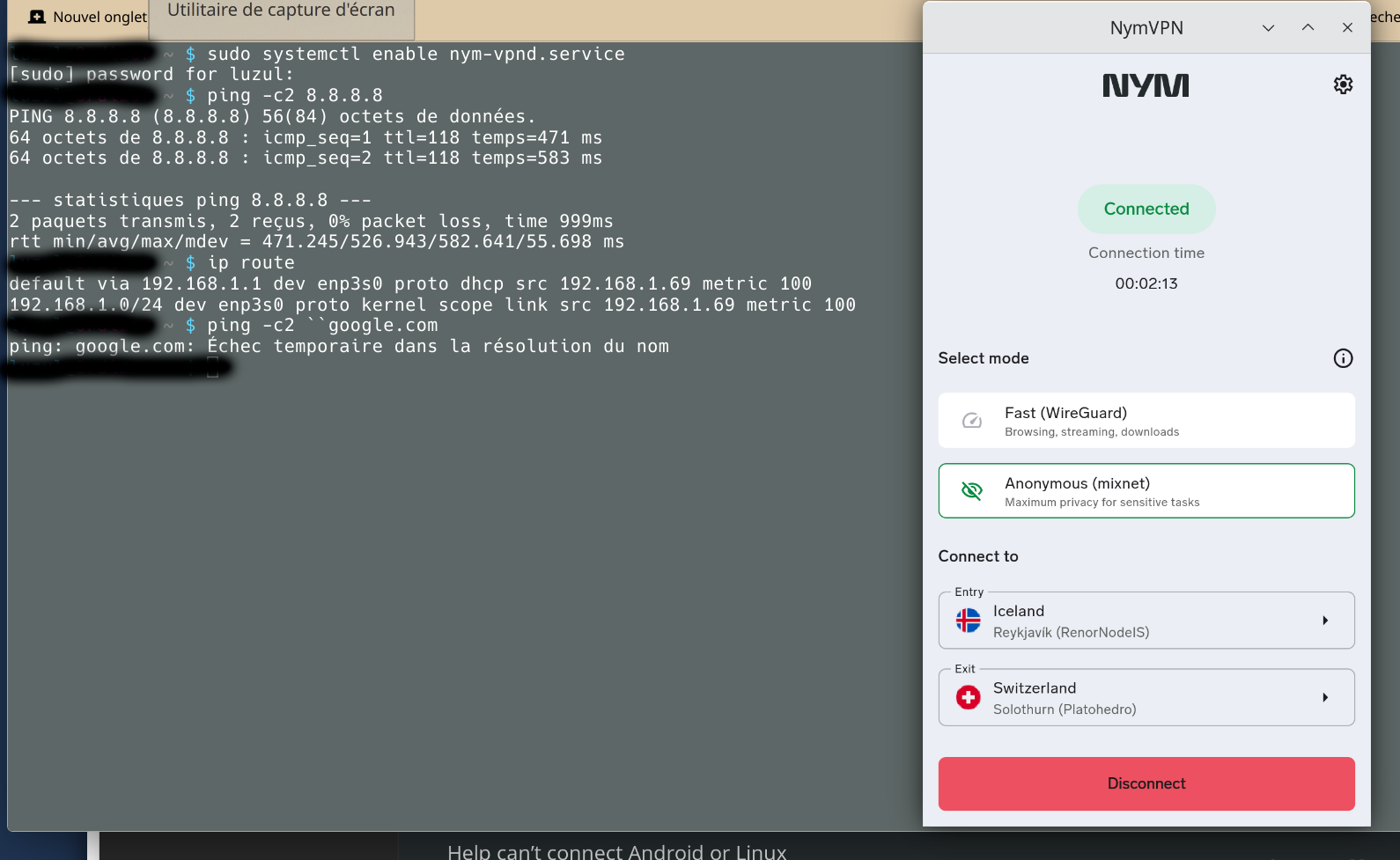
As to there being no connection to the Internet, try running ping -c2 8.8.8.8 If you can’t ping the (Google) IP address, type ip route and report what it shows. If you can ping that IP address, try ping -c2 ``google.com
I successfully started and restarted nym-vpnd.
Then I started nym, which asked for the admin password. The connection was established.
Here are the ping results.
I don’t wish to over-simplify your issue, but I also had problems installing Nym from both Flatpak and from the standard Linux installation method. What did work was the Appimage.
Is it possible in your case to attempt this installation and see if it works?
If you’re referring to the Appimage from the nym website, I tried that too, but it didn’t work.
But I’ll give it another try next month. I won’t have time to do it this month.
Thanks for your feedback.
The pings are getting through and those 500 ms ping times confirm that it’s the “anonymous mixnet”. (2-hop will probably be closer to 50 ms.)
The ip route is not what I expected to see (no tun*) but it’s what I also see when using the mixnet.
As to the command ping -c2 ``google.com I’m not sure how those two backquotes got in there but I’ve confirmed that the command still works. Why it doesn’t work for you suggests that you’re having a DNS problem, which is why it seems like you’re not connected to the Internet. Perhaps file /etc/resolv.conf might contain some clues.
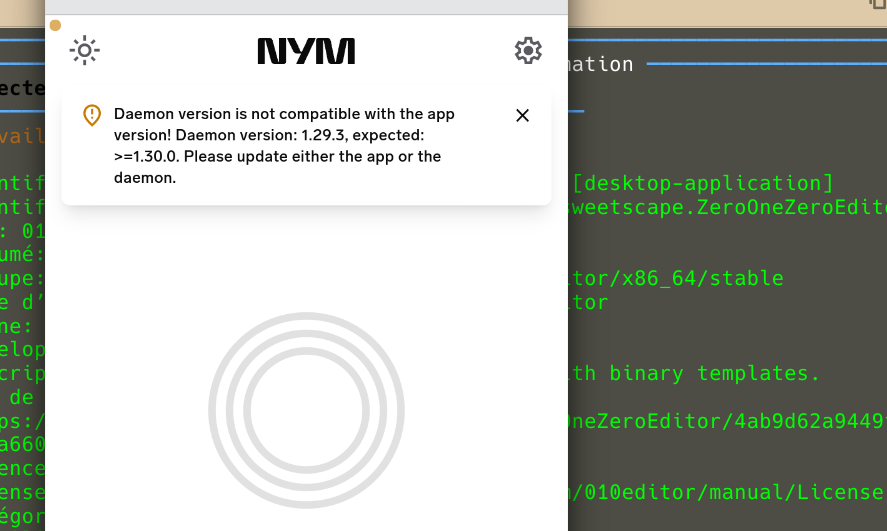
I’ve tried again to get NymVPN working.
I’m no longer getting the errors I had before, but I don’t have the correct version of the daemon.
How do I update this version?
Thank you for your help.
This ↑↑↑↑ its a universal script for installation, flatpak says that as the flatpak version is just the frontend app, it needs to connect to the backend daemon to function, you should be fine to go with this. Whenever you download or update its better to go with it, to prevent daemon and app version mismatches